
Flourish by Garden Joy
Burlingame StudiosSimulation
4.712.35K Reviews
- Version
- 1.54.33
- Installs
- 1.00M
- Age Rating
- Everyone
Screenshots

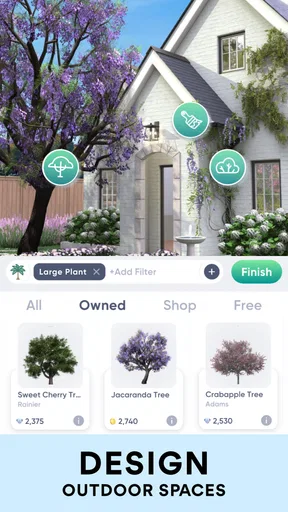
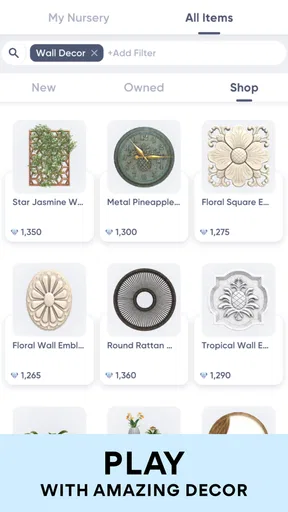


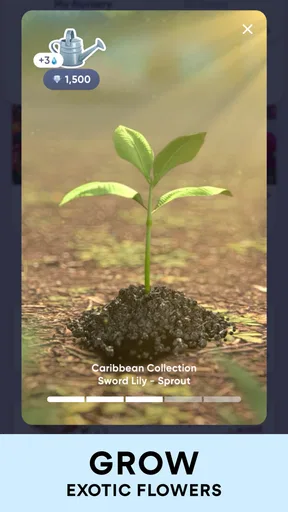


Our Review of Flourish by Garden Joy
 Analysis by Appyee
Ever dreamed of transforming your backyard into a stunning oasis? Well, that’s exactly what Garden Joy: Exterior Designer lets you do, right from your smartphone. I’ve been diving into this app for a while now, and let me tell you, it’s like having a virtual green thumb.
For a first-time user, the appeal is simple: you can explore outdoor design ideas without needing to move furniture, buy plants, or commit to a real garden plan. I’d treat it as a creative sandbox rather than a precise landscaping tool. It is most satisfying when I use it to imagine a mood or arrangement, then take those ideas into the real world with a more practical eye.
A useful first goal is modest. Instead of trying to redesign an entire yard in one sitting, I’d choose one area—a bare corner, a patio edge, or the space beside a path—and make a single design that feels coherent. That gives you a clear result to judge, and it helps you learn the controls before the screen fills with objects.
First Impressions
The moment I opened Garden Joy: Exterior Designer, I was greeted with a vibrant interface that’s as inviting as a sunny day. The colors pop, and the layout is super intuitive. Even if you’re not a tech whiz, you’ll find navigating through the options a breeze. It’s like the designers knew exactly how to make everything just click.
Garden Joy is a free simulation game from Burlingame Studios, rated for Everyone, and it has found a sizeable audience, with more than a million installs and an average rating of 4.7 from around 42,000 ratings. It first appeared on March 23, 2023, and version 1.49.31 is listed for devices running Android 7.0 or later. Those details make it easy to know whether it fits your device and household, though the overall experience matters more than the numbers: this is designed to be approachable, not a demanding design program.
One of the first things I noticed was the variety of plants, furniture, and decorative elements you can choose from. Seriously, there’s a whole nursery in there! Whether you’re into succulents or prefer the lush look of tropical plants, this app’s got you covered.
The breadth of choices is most useful when you give yourself a small design brief. I might decide to make a quiet reading spot, a colorful entry, or a corner that feels more structured. That little constraint makes browsing feel purposeful; otherwise, it’s easy to keep adding attractive objects without deciding what the space is meant to do.
Designing Your Dream Garden
So, how does it actually work? You start by snapping a picture of your current outdoor space. The app then lets you overlay different plants, stones, and furniture to see how they’d look in your backyard. I was amazed at how realistic the renderings are. It’s like magic seeing those new elements blend seamlessly with your existing setup.
For a first meaningful result, I’d photograph a relatively clear patch in ordinary daylight and begin with just one anchor item, such as a chair or a large planter. Then I’d add smaller pieces around it. This order helps me judge whether the layout has a focal point before I get distracted by decorative details. If the photo already contains a lot of visual clutter, a simple first design is easier to read than a full makeover.
It’s worth remembering that a convincing visual placement is not the same as a measured construction plan. I use the preview to test color, balance, and general scale, but I wouldn’t rely on a phone image to settle exact spacing or whether a real plant will thrive in a particular spot. For purchases or building work, I’d check the actual dimensions and growing conditions separately. That distinction keeps the app fun and prevents an attractive mock-up from being mistaken for a guarantee.
One feature I found super handy is the ability to adjust the size and placement of elements with a simple pinch or drag. It’s a bit like playing Tetris, but with flowers and garden gnomes. Plus, you can save multiple designs, which is perfect if you’re indecisive like me.
Saving alternatives is more than a convenience: it gives me a straightforward way to compare different directions. I might keep one version restrained and another with more color, then look at them again later instead of trying to remember which arrangement felt better. A practical tip is to change only one major choice between versions. If I swap the seating, plants, and overall palette at once, I can’t tell which change improved the result.
The drag-and-resize controls also reward a little patience. When an object looks oddly large or seems to float out of place, I’d adjust its size first and then reposition it, rather than repeatedly dragging it around. Small corrections are easier to assess against the photo. I’d also stop once the main arrangement reads clearly; extra ornaments can make a design busier without making it more useful.
Getting Creative
Now, if you’re someone who loves to get creative, Garden Joy gives you plenty of room to flex those design muscles. The app includes a bunch of challenges and design prompts that can really get your creative juices flowing. I tried my hand at designing a Zen garden and, not to brag, but it turned out pretty zen-tastic.
Prompts are especially helpful when you don’t have a real yard or a specific project in mind. They give you a reason to try a style you might not choose on your own, and they turn a blank starting point into a manageable exercise. I’d approach each one as a design experiment: pick a simple theme, make the central idea obvious, and avoid treating every available item as something that must be used.
There is a trade-off here. A prompt can be a nice nudge, but anyone looking for a deep, technical landscape-planning workflow may find a casual simulation too loose. I wouldn’t choose this over a dedicated planning tool when I need reliable measurements, construction documentation, or detailed horticultural advice. Garden Joy is better when the question is “Would this look inviting?” than when it is “Can this be built exactly as drawn?”
What’s cool is the app also offers expert tips and tricks for gardening. So, if you’re a newbie worried about keeping your digital plants alive, you’ll find plenty of helpful advice here. It’s like having a gardening guru in your pocket.
I’d use those tips as a starting point for learning, not as a substitute for checking what a real outdoor space needs. Advice is most helpful when I connect it to a specific choice I’m making, such as whether a plant suits the look I want or how to think about a garden arrangement. If I’m planning a real purchase, I’d still confirm suitability for my climate, light, soil, and maintenance routine before spending money.
The game is a particularly good fit for someone who enjoys decorating but is not ready to take on a physical project. It also works for a homeowner who wants inspiration before talking through ideas with family, or for a renter who can play with layouts without making permanent changes. If the goal is instead to calculate materials, map boundaries precisely, or receive a professional landscape plan, I’d look for a more specialized option.
Community and Sharing
One of the unexpected perks of using Garden Joy is becoming part of a community. The app lets you share your designs with other users, and you can even get feedback. It’s a bit like Instagram for garden enthusiasts. I’ve picked up some great ideas just by browsing what others have created.
When I browse other designs, I find it more useful to look for a single idea I can adapt than to copy a complete scene. A color pairing, a way of framing a seating area, or a balance between open space and decoration can spark something without assuming that another person’s layout will suit my own photo. That makes community browsing a source of inspiration rather than a substitute for making choices myself.
Feedback can also help me notice how a design reads to someone who did not create it. If a focal point is unclear or the arrangement feels crowded, another person may spot that quickly. I’d still treat reactions as opinions rather than instructions: the best design is the one that matches the purpose of the space, not necessarily the one that attracts the most attention.
If you’re into social media, sharing your creations on platforms like Facebook or Instagram is a breeze. Who wouldn’t want to show off their virtual green space?
For a low-pressure everyday routine, I can imagine opening the game during a short break, saving one version of a patio idea, and returning later with a fresh view. That’s a better use of it than expecting to finish a complete real-life garden plan in one session. The saved alternatives give the idea room to develop, while sharing is there if I want outside reactions rather than a final verdict.
What to Know Before You Settle In
Garden Joy is free to download, but it includes optional in-app purchases ranging from $0.99 to $99.99 per item. I’d start by exploring the free experience and decide whether I’m enjoying the design process before considering any purchase. Those prices span a broad range, so it’s sensible to check the cost of an individual item carefully rather than assume every extra is a small add-on.
As with many design games, the main friction is not difficulty so much as decision fatigue. A large catalog can make it tempting to keep browsing instead of finishing a scene. I find it helps to set a short goal—choose a focal object, settle on a general style, and make one saved version—then stop. If I want another look, I can make a separate alternative instead of endlessly undoing a design I may have liked.
It may not suit someone who wants a competitive game, a realistic gardening simulator focused on plant care, or a precise tool for professional work. Its appeal is visual creativity: trying arrangements and enjoying the transformation. If that sounds relaxing, the learning curve feels gentle; if you prefer strict objectives or exact measurements, the loose, decorative approach may feel limiting.
The Verdict
So, is Garden Joy: Exterior Designer worth downloading? Absolutely. Whether you’re a seasoned gardener or a total novice, this app is a fantastic way to explore garden design without getting your hands dirty. It’s fun, easy to use, and packed with features that’ll make any garden lover swoon.
My recommendation is strongest for first-time users who want a friendly place to experiment, gather ideas, and compare a few different looks. I’d begin with one corner of a space, save two deliberately different versions, and use the one that feels right as inspiration rather than a precise blueprint. That simple workflow makes the first session feel rewarding without turning a casual game into a chore.
In a world where we often need a little escape, Garden Joy offers a slice of tranquillity and creativity. So go ahead, give it a whirl, and watch your garden dreams come to life!
Verdict
Strengths of Flourish by Garden Joy
- Intuitive interface for easy navigation.
- Wide range of design tools available.
- High-quality graphics enhance experience.
- Regular updates with new features.
- Community sharing for inspiration.
Limitations of Flourish by Garden Joy
- Requires stable internet connection.
- In-app purchases can add up.
- Some features locked behind paywall.
- Ads can be intrusive at times.
- Limited offline functionality.
Similar Picks in This Category
View All
Truckers of Europe 3
Wanda Software4.3

Town Building Life Simulator
XGame Global4.2

Fidget Toys Trading・Pop It 3D
Freeplay Inc4.7

Sculpt People
CrazyLabs LTD4.4

Scary Teacher 3D
Z & K Games4.2

Hair Tattoo: Barber Shop Game
CASUAL AZUR GAMES4.3
Frequently Asked Questions
What is Garden Joy: Exterior Designer, and what does it offer?
Garden Joy: Exterior Designer is a mobile application designed for both Android and iOS platforms. It allows users to create and design their dream garden landscapes with a variety of tools and features. Users can choose from a wide selection of plants, furniture, and decorative elements to visualize and plan their outdoor spaces.
Is Garden Joy: Exterior Designer free to use?
Garden Joy: Exterior Designer offers a free version with basic features, allowing users to explore and create simple designs. However, it also includes in-app purchases and subscription options for advanced tools and additional content, such as premium plants and exclusive design templates, enhancing the overall experience for dedicated users.
What are the system requirements for Garden Joy: Exterior Designer?
To run Garden Joy: Exterior Designer smoothly, Android users need a device with at least Android version 5.0 or higher, whereas iOS users require iOS 11.0 or later. A stable internet connection is also recommended for downloading additional content and accessing online features. Ensure your device has adequate storage for optimal performance.
Can I share my garden designs with others using Garden Joy: Exterior Designer?
Yes, Garden Joy: Exterior Designer allows users to share their creations with friends and family. You can export your designs as images or share them directly through social media platforms and messaging apps. There is also a community feature where users can showcase their work and gain inspiration from others.
Does Garden Joy: Exterior Designer offer tutorials or support for new users?
Garden Joy: Exterior Designer includes a comprehensive tutorial for new users, guiding them through the app's features and functionalities. Additionally, there is a support section with FAQs, tips, and troubleshooting advice. Users can also contact customer support directly for further assistance if needed.
Play our best games!


